
By Dr Fadh Yusof
As you rotate through different hospitals and specialties, administrative requirements can feel like an added burden on top of an already demanding clinical workload. Learning a few key digital systems early in your career can significantly reduce this pressure, and one of the most important is PRODA (Provider Digital Access).
PRODA is an online identity verification and authentication system managed by Services Australia. It provides secure access to multiple government digital services without the need for physical tokens or specialised hardware. Register for PRODA.
Rapid provider number applications
A common administrative challenge for junior doctors is applying for a new provider number with each rotation. By linking PRODA to HPOS (Health Professional Online Services), you can apply for provider numbers online and receive approval almost immediately. Link your PRODA account to HPOS.
To apply for a new provider number:
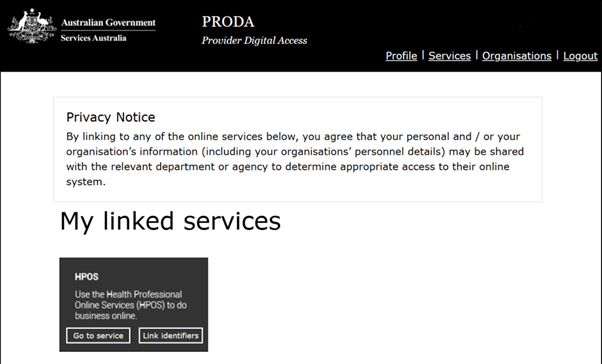
Step 1: Log in to PRODA and open HPOS. Once HPOS is linked to your PRODA account, select ‘Go to service’.
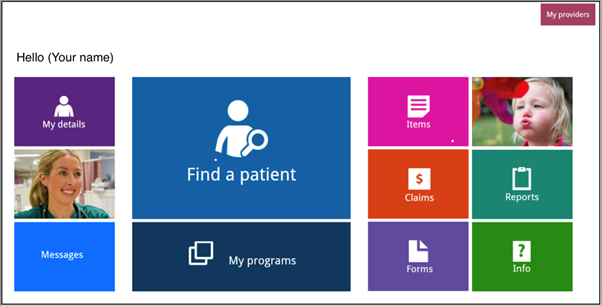
Step 2: Select ‘My details’ from the top left tab.
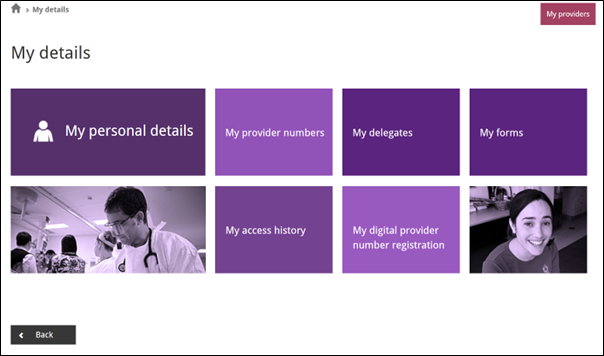
Step 3: Open the ‘My provider numbers’ tab.
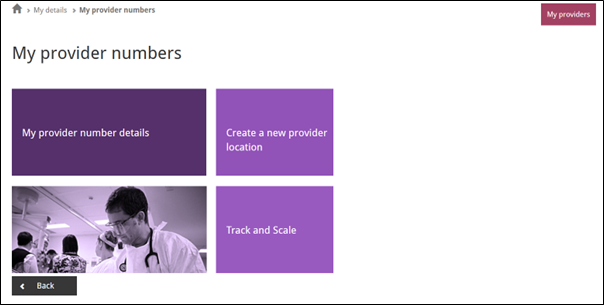
Step 4: Select ‘Create a new provider location’ and follow the steps to complete your application.
Learn more about provider and prescriber numbers.
Instant PBS authority approvals
Navigating the Pharmaceutical Benefits Scheme (PBS) can be time‑consuming, particularly when medications require prior authority. PRODA provides access to the online PBS authorities system, allowing you to:
Submit authority applications in real time
Receive immediate approval for most requests
Avoid prolonged waits on the PBS phone line.
To use this feature, follow these steps:
Step 1: Log in to PRODA and open HPOS. Select ‘My programs’ and then ‘PBS Authorities’.
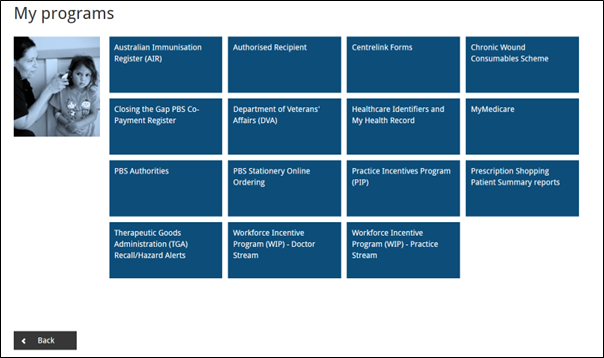
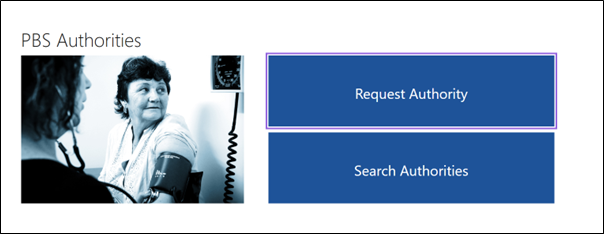
Step 2: Select ‘Request Authority’ to begin.
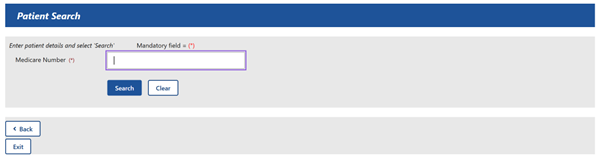
Step 3: Enter the patient’s Medicare number to search for their details, then select ‘Search’.
Step 4: Choose the PBS item being prescribed and enter prescription details, including dose and frequency.
Step 5: Complete the remaining steps by selecting the appropriate restriction code, answering any PBS‑related questions, attaching supporting documents if required, and submitting the application. Review your details, endorse the prescription with the authority approval number and PBS item code if approved, and finalise the request as instructed.
It helps to keep the PBS website open at the same time so you can verify the correct item code, indication and restriction criteria for the medication you are prescribing.
Learn more about applying for PBS authority.
Dr Fadhullah (Fadh) Yusof is a Paediatric Registrar at Monash Children’s Hospital.